vimfluency
Drill explicit vim behaviors, measure your real per-behavior rates, and improve them over time — inside real vim, not a simulator.
GitHub → free & open source (MIT) · Vim 8.1+ or Neovim
 move one char, 4-way (hjkl) rate 44/min aim 60/min

      a s d f g h j k l

      reach the green cell — the runner logs which motion, and how fast
what it is
Most vim trainers teach syntax and stop. But knowing what dw
does isn't the same as reaching for it without thinking, and nothing
measures that second gap. Vim Fluency drills explicit, isolated behaviors
to a frequency aim and tracks your real rate per behavior over time, on a
Standard Celeration Chart, inside real vim.
41 drills ship today across survival, motion, visual, delete, indent, and recall families, grounded in Direct Instruction and Precision Teaching. The aim numbers are starting guesses — real aims will come from aggregated community data, not intuition.
install
Plug 'codyalanstubbs/vim-fluency' " vim-plug
      { 'codyalanstubbs/vim-fluency' } " lazy.nvim
start
Open the dashboard, then walk the first three drills — each has a lesson that hands off into a timed session:
:Vf " dashboard

      :VfLearn move_single_char_up_down_left_right " hjkl — move, 4-way
      :VfLearn move_to_word_start_forward_backward " w / b — word motions
      :VfLearn save_vs_quit " :w / :q — survival
Swap :VfLearn for :VfTrain to drill against
the clock. :VfChart {id} plots your progress over time.
a guided tour
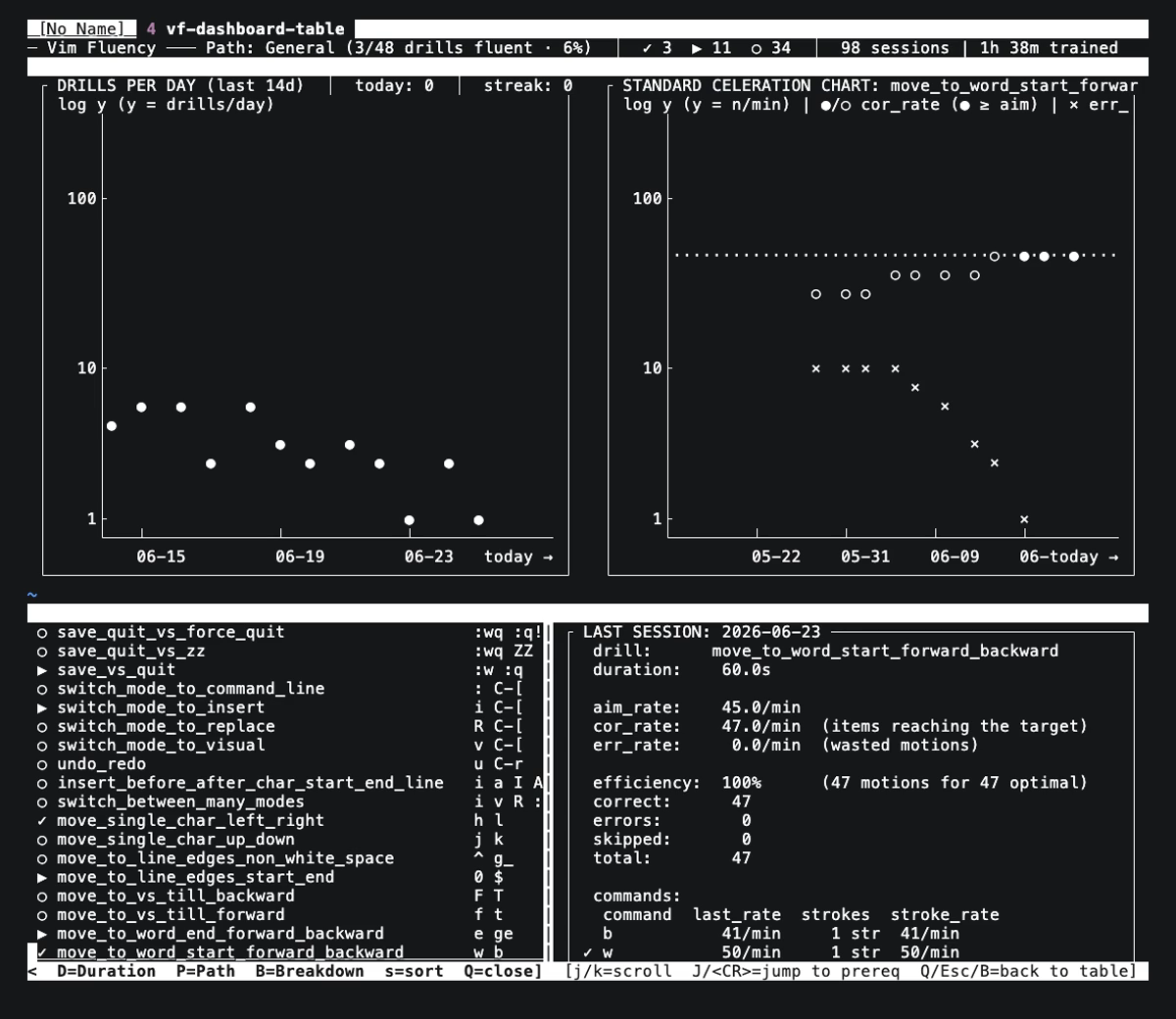
The dashboard (:Vf) — your home base
The main entry point. From one screen you discover drills, monitor consistent overall effort (drills per day — fluency is built by showing up), watch a specific drill's fluency progress, and read its last session's per-command breakdown. The panels track your cursor as you move between rows.
:VfList — the quieter catalog
The same discovery surface with less on screen: a flat table of every
drill, its commands, prereqs, and rate against aim. Press B
to expand a drill's breakdown; the header tracks your progress along the
active path.
:VfLearn and :VfTrain — learn it, then make it fluent
:VfLearn introduces a drill — a Direct-Instruction lesson
that names each motion, has you perform it, then tests you until you can
apply the rule unprompted. A good warm-up. :VfTrain is where
fluency is built and measured: a timed session scored as a rate and
logged, so you can watch that rate climb over time.
Paths — focus your effort
A path scopes the catalog to what matters now. Foundational is the
survive-and-edit basics; General is everything. :VfSetPath
switches the active path and every view re-filters to it. (Specialized
workflow paths are coming soon.)
:VfChart — the full picture, and a diagnosis
The dashboard's inline chart is squeezed by spacing; :VfChart
opens the full Standard Celeration Chart. It's also a diagnostic — when
the × error line rides above the correct line,
you're going too fast. Slow down until corrects climb back over errors.
Accuracy first, then speed.
The end-of-session breakdown
Every training and lesson ends on the same screen: your rate against aim, your efficiency, and a per-command table that marks which motion is holding you back. A one-key menu jumps you straight to whatever's next.